![White logo TopLeft_240x78.png]](https://help.topleft.team/hs-fs/hubfs/White%20logo%20TopLeft_240x78.png?height=50&name=White%20logo%20TopLeft_240x78.png)
When viewing your PSA work in TopLeft, you need to define which tickets or projects you want to see. Usually you don't want to see all your PSA's tickets together in a single view, since you have multiple teams and a variety of types of work.
Views offer a powerful way to define which records appear: a query builder that offers boolean logic (and/or and groups), negation, string matching, and autocompletion.
For example, the following query returns records assigned to any of the three chosen companies and set to priority 1 - emergency response.
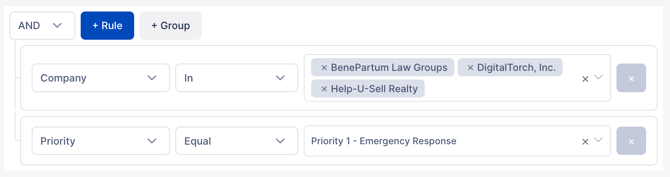
To the right of the query builder is a preview pane that shows a sample of the records responsive to the query and the total number of matched records. It updates whenever you change the query.
The type of the field in the match defines the available matching options. For example, the company match (a related record) has different matching options than the due date match (a date).
The main options are as follows.
Related Records
For example, a ticket's assigned members, company, or agreement.
- Equal: the related record is the selected option
- Starts with: the name of the related record starts with the provided value
- Contains: the name of the related record contains the provided value
- In: the related record is one of many selected options
- Is Null: there is no related record
- Is Empty: there is no related record
Numeric values
For example, budget hours.
-
Equal
-
Less than/greater than
-
Less than/greater than or equal
-
Greater than
-
Between
-
Is Null
Text
For example, ticket summary.
- Contains
- Starts with
- Ends with
Dates
For example, created date.
- Equal
- Before/after
- On or before/after
- Between
- Is null: no date is set for the field
Some date fields are handled as numeric fields to provide for relative handling of dates. For example, "Due date (days from now)" takes a numeric value of days- positive for future dates, negative for past dates.
Boolean
For example, whether the customer has updated a ticket since a technician last worked on it.
- Equal
Custom fields/UDFs
Custom fields can be used as matches. The available options depend on the type of custom field.