![White logo TopLeft_240x78.png]](https://help.topleft.team/hs-fs/hubfs/White%20logo%20TopLeft_240x78.png?height=50&name=White%20logo%20TopLeft_240x78.png)
TopLeft has a new user interface (UI). We built the new UI to be faster and easier to use than the old UI.
The new UI is not turned on by default, but it's already used by many customers. The new UI is the only UI available for HaloPSA customers.
The new UI is a per-user option. Even if you turn it on for yourself, other users in your company will not use the new UI, except if they follow links in the main menu to new UI Views.
When you enable the new UI, here's what will happen:
- The UI for general app pages (ie dashboard, account settings, and so on) will change to the new UI.
- You will no longer be able to create Kanban boards in the old UI. Instead, you will create new Views. Views are like Boards, but a lot more flexible.
- Existing old-UI boards will still be available and will still appear in the old UI. You can still use them, edit them and delete them.
Introduction
Watch this video for a demonstration of the new UI.
How to Enable New UI
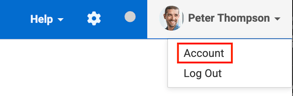
To turn it on, click your name in the top-right corner of the app, then Account, then enable the "New UI" option, then click Save.
If you create new UI Views, and then disable the above option, the new Views will still be available to you and other users.
Create Your First New View
To use the new UI for a Kanban board or Gantt chart, create your first View.