![White logo TopLeft_240x78.png]](https://help.topleft.team/hs-fs/hubfs/White%20logo%20TopLeft_240x78.png?height=50&name=White%20logo%20TopLeft_240x78.png)
This document describes TopLeft's older UI. We recommend you use our new UI, which has new visualizations, better performance, and more flexibility.
In a Kanban board, cards represent work items. Everything your team is doing should be represented by a card on the board. This is the visualization of the work in Kanban.
In TopLeft, cards look like this:
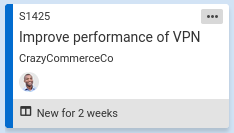
Each type of Kanban card in TopLeft is a bit different. Choose your type of board from the list below to see more information about that type of card.
| ConnectWise Manage | Datto Autotask PSA |
| Tickets (service or project or both) Projects Sales Opportunities Activities |